Blog
Welcome


Recent posts
SEARCH RESULTS FOR: Layouts
This week we're planning to cover another five topics to add to our growing collection of classroom movies... - Exporting your page layouts - Sending your order - Image management (problems and fixes) - Sorting and selecting your images (the Collection Builder) - Power users tips and tricks Click here to register and for more information. There are now 11 movies on our new classroom movie page where you'll find the entire series so far. For best viewing we suggest watching them full screen, in HD. Cheers, Nigel To View More >>
This entry was posted in by Admin

Last Friday NZT Stephen, Danny and Ian ran an impromptu webinar to introduce the Queensberry Press and demonstrate how to design the books. This excerpt concentrates on the "how-to". Much of the new functionality is behind the scenes (eg built-in colour management to convert the exported layouts to the printer colour space) but Danny concentrates on the process, especially how to specify the books and design the covers. Click here to watch it full screen. Cheers, Ian To View More >>
This entry was posted in by Admin
When I talk to Photojunction users and they express frustration with the application, I have to know more. When we hear so many users rave about how much time it has saved them, I am just perplexed when someone feels the exact opposite. For example, I've talked to few of you who are frustrated with the time consuming nature of exporting high res layouts when you simply want to send a client a layout to approve. Or, you had to make tiny changes requested by the client and had to deal with the Problem Reporter all over again. High Res exports of layouts only need to happen once. This step in Photojunction To View More >>
This entry was posted in by Admin
Let's wrap up this Problem reporter series and stop ignoring the elephant in the room… Who needs a problem reporter anyway? After all, as we confirmed at the webinar it drives some people nuts. Well I'm glad you asked! I should start by saying it's not an unusual concept. Try googling "pre-flight", for example, and check out the Wikipedia and Adobe listings in particular. What the pre-flight process does in the printing industry is ensure that digital files sent for printing are all present, valid, correctly formatted, and of the desired type. Why? Because, if they're not, the job can't be done. To View More >>
This entry was posted in by Admin

While we were finalising our wedding album, our photographer asked us what I thought was an insignificant question. Having received the album, I now understand why, and I think it's important. The question soon, but first the back-story. The first time my wife Kayla and I saw our photographs was as a slideshow. If you've ever seen one of Johannes' slideshows, you'll know how beautiful they are. We were drawn in by the imagery, the music, the timing. And having not seen our photos until that point, we instantly felt a strong connection to them. Framing them in a slideshow format helped tell our To View More >>
This entry was posted in by Admin

Hello dears, if you're like me you find the modern inter-web and computer thingamys a little overwhelming. in fact I had a conniption the first time my nephew plugged my Macintosh SE into a network and I've never been really comfortable since. But I like what it lets me do, so I struggle along. I did peek in my iTunes music folder once (looking for my old Tom Jones and Seekers' records) but I thought, "Good grief, that looks complicated," and I've never looked again. I suspect that's exactly what Apple want. They don't even mention their "back end" (nasty expression) because you can really get To View More >>
This entry was posted in by Admin

Shortly after the iPad was announced, Nigel posted about wanting to run Photojunction on it. While that hasn't happened (yet), the iPad has become quite a popular tool for photographers. Personally, I like to use it to present final album designs to clients. Photojunction makes creating and editing layouts so simple, that sitting there with a client flicking through their spreads takes the mystery out of knowing exactly what they'll end up with. There are so many presentation options within Photojunction, but here's a few that work with the iPad... 1. Slideshows Want an album slideshow to fit perfectly To View More >>
This entry was posted in by Admin
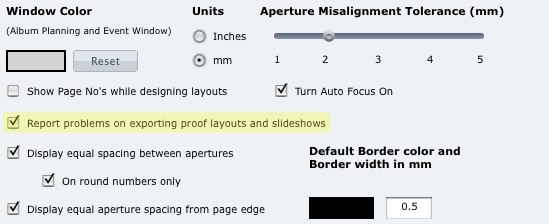
You can now choose in the Photojunction Preferences to have the Problem Reporter report on any problems in your album design when you create a slideshow or proof sheets from it. Why's that useful? Well you'll need any problems fixed before you order the album, so if you're going to create a slideshow or proof sheets of it, you can be sure they're perfect too, and exactly as per the album. This option is set on as a default but you can turn it off by heading to the Preferences and unchecking 'Report problems on exporting proof layouts and slideshows'. Easy. Cheers, Nigel To View More >>
This entry was posted in by Admin

All the options in Slide show can be set as defaults in preferences. Big time saver. Next in this series Cheers, Danny To View More >>
This entry was posted in by Admin
If you want your order to sail smoothly through our ordering process, please make sure it's ready to go before you send it. Hopefully this post will give you some insight into why that's so important – why even minor changes to an order can cause a lot of work at our end. For example, suppose you request design or layout changes, or send us new versions of image files or album plans. First we have to call up your original order and work out exactly what you want done to it – not easy when we have hundreds of albums working their way through production at any one time. We may need to, for example: To View More >>
This entry was posted in by Admin